By the Malik Rashid | Published: October 8, 2026 | Last updated: October 8, 2026
Search engine optimization (SEO) is the work of getting your website to show up on Google when people search for what you sell. If you have ever wondered why a competitor ranks above you, or what an SEO company actually does with your money, this guide is for you.
At Boost Branding, a digital marketing agency in Bahawalpur, business owners ask us the same questions again and again. So we put the answers in one place. First, 19 common SEO questions. Then the SEO services that make up a full strategy, from audits to digital PR. Read it top to bottom, or jump to the part you need.
What Makes Up SEO?
SEO is made up of four main parts: technical SEO, on-page SEO, off-page SEO and content. Local SEO sits on top of these if you serve customers in a specific area.
Think of your website as a shop. Technical SEO is the building, on-page SEO is how you arrange the shelves, content is what you sell and say, and off-page SEO is your reputation in the neighborhood. If one part is weak, the others work harder for less.
If you’re wondering about the SEO meaning, it simply stands for search engine optimization: improving your site so search engines like Google and Bing can crawl it, index it and show it on the search engine results page (SERP). Every part below serves that goal. User experience is what ties them together, because Googlebot and your visitors both prefer sites that are easy to use.
| Part | What it covers | Simple example |
|---|---|---|
| Technical SEO | How easily Google can crawl, read and load your site | Fixing broken links and slow pages |
| On-page SEO | Signals you control on each page | Writing a clear title tag and meta description |
| Content | Pages that answer what people search for | A guide that solves one specific problem |
| Off-page SEO | Signals from outside your website | Earning backlinks from trusted sites |
| Local SEO | Visibility for nearby searches | Keeping your Google Business Profile accurate |
We cover each of these in detail further down.
Why Should You Invest in SEO?
Because SEO brings you visitors who are already searching for what you offer, and that traffic keeps coming without you paying for every click.
An ad stops the moment you stop paying. A page that ranks keeps working for you. That is why many business owners treat SEO as an asset, not an expense.
- Qualified traffic: People searching “seo services” or “web developer near me” already want something. You are meeting them at the right moment.
- Trust: Showing up in search results helps people see you as a real, established option.
- Compounding results: A good page can keep bringing visitors for years, and each new page builds on the last.
- Better value over time: Once a page ranks, the cost per visit usually falls compared with paid ads.
When you measure SEO ROI, count the leads and sales that come from organic search, not just rankings. Our SEO service is built around exactly that.
To see the benefits of SEO in numbers, track organic traffic and conversions in Google Analytics (GA4). Set up conversion goals such as form fills, calls or purchases, so you can connect organic traffic to lead generation. SEO ROI is then easy to work out: the revenue from organic leads compared with what you spent. Done well, SEO is cost-effective marketing that builds brand visibility, trust and long-term growth, and the leads are qualified because they came from someone searching for exactly what you do.
How Long Does It Take to Get SEO Results?
Early movement often shows up within a few months, but steady, business-changing results usually take longer. The exact time depends on your competition and where your site starts.
Nobody can promise a date, because Google controls the results. Be careful with any SEO company that does. A rough rule of thumb is that you might see early signs, like more impressions in Google Search Console, in the first few months. Leads and sales usually follow after that.
| Factor | Results come faster when… | Results come slower when… |
|---|---|---|
| Site age | The site is established | The site is brand new |
| Competition | Few strong sites target your keywords | Big brands target the same keywords |
| Technical health | The site is clean and fast | The site has crawl or speed problems |
| Content | You already have useful pages | You are starting from nothing |
| Backlinks | Trusted sites already link to you | You have few or no links |
The fastest wins usually come from fixing technical problems and improving pages that already get some impressions.
A realistic SEO results timeline looks like this. In the first month the work is audit, fixes and planning, and Google needs time to crawl and index the changes. Many sites see early movement somewhere around the three to six month mark, but that’s a rule of thumb, not a promise. Your SEO strategy affects the speed too. Domain authority, the strength of your backlink profile and how often you publish (content velocity) all play a part, and on bigger sites so does crawl budget, which is simply how many pages Google will crawl in a given period. Check Google Search Console each month for impressions and indexed pages. You’ll see progress there before the leads arrive.
Why Boost Branding?
Because you get SEO, web development, content and paid marketing from one team, and we explain what we do in plain language.
Many SEO agencies only handle rankings and leave your website to someone else. That creates delays. We work as one team, so a slow page, a weak blog post and a missing link can all be fixed in the same plan.
Whether you choose an SEO agency, an SEO company or an independent SEO consultant, look for four things: a custom strategy built around your business, white hat SEO methods, transparent reporting (ideally using tools like Ahrefs, Semrush and Google Search Console) and case studies that show real work. SEO packages can be a good starting point as long as they can be adjusted to your goals. That’s the standard we hold ourselves to at Boost Branding, and we stay results-driven: the aim is enquiries and sales, not only rankings.
- Clear process: We start with research on your business, market and competitors, then target the right audience, then track measurable results.
- Specialists on the team: Our team includes people who focus on SEO and blogging, and WordPress and SEO experts.
- Real client feedback: One client, UK-StreamTV.com, reports on our site that their organic traffic grew by 295% after working with us.
- Based in Bahawalpur: You can talk to us directly, by phone or in person.
Curious what we do day to day? See our about us page and portfolio, check the price table, or request a quote.
Does My Business Need SEO?
If your customers search online before they buy, yes. A quick test: search for your own service on Google and see who shows up.
If your competitors appear and you don’t, you are losing those customers to them. SEO matters most for these businesses:
| Business type | Why SEO helps |
|---|---|
| Local service businesses | People search “near me” and pick from the first few results |
| Online stores | Product searches bring buyers without ad spend on every sale |
| Agencies and B2B companies | Decision makers research providers on Google before calling |
| New businesses | Organic search builds awareness without a big ad budget |
SEO for small business works especially well when you focus on a narrow set of searches you can actually win, rather than trying to rank for everything.
If you serve local customers, start with local SEO. Complete your Google Business Profile so you can appear in the local pack, the map results shown above the regular listings for searches like “near me”. Customer search behavior is simple here: people search for a service, look at the first few results and call. Strong online visibility in organic search puts you in front of those local customers before your competitors. As for how much SEO costs, it depends on your competition, your starting point and how much work is needed, so a quote after a quick review is more reliable than a flat number.
How Does SEO Work?
SEO works by making your pages easy for Google to find (crawl), understand (index) and trust, so it can show them when someone searches for something relevant (rank).
Here is the process in plain words:
- Crawling: Googlebot follows links from page to page to discover content.
- Indexing: Google reads the page and stores it, if it is useful and not blocked.
- Ranking: When someone searches, Google picks the pages that best match the search intent and shows them on the search results page (SERP).
Google describes the things it looks at as relevance, content quality, usability and context. It doesn’t publish a full ranking formula, which is why SEO has several parts. Most problems come from one of the three steps above breaking down: a page that can’t be crawled can’t be indexed, and a page that isn’t indexed can’t rank.
If you’re new to SEO, the most useful tip is to think like the searcher. Google’s algorithm uses systems like RankBrain to work out what a search means, even when the words don’t match your page exactly. That’s why relevance and authority both matter. Relevance is whether your page matches the search intent. Authority is whether other sites trust you enough to link to you. Get both right and your pages have a real chance of staying in the index and moving up.
How Can I Find the Keywords People Are Searching For?
Start with your own services, then check real search data in tools like Google Keyword Planner and Google Search Console, and paid tools such as Ahrefs or Semrush.
Keyword research doesn’t need to be complicated. Follow these steps:
- Write down your services in the words your customers would use, not your own industry terms.
- Check Google’s autocomplete and the People Also Ask box for extra phrases real people type.
- Open Google Search Console to see which searches already show your site.
- Use a keyword tool to see search volume and keyword difficulty for each phrase.
- Look at the results page for each keyword. If Google shows guides, write a guide. If it shows service pages, build a service page.
- Group keywords by page, so each page targets one main topic.
| Tool | Best for | Cost |
|---|---|---|
| Google Keyword Planner | Search volume ideas | Free (needs a Google Ads account) |
| Google Search Console | Queries your site already gets | Free |
| Google Trends | Seasonal and rising searches | Free |
| Ahrefs / Semrush | Difficulty, competitors, long tail keywords | Paid |
Long tail keywords, which are longer and more specific phrases, usually have lower search volume but are easier to rank for and closer to a buying decision.
The list you write in step 1 is your set of seed keywords. A keyword research tool expands them into related phrases and shows three numbers worth understanding: search volume (how many people search each month), keyword difficulty (how hard it is to rank) and CPC, the cost per click advertisers pay, which hints at how commercial the search is. If you want a free keyword research tool, Google Keyword Planner, Search Console and Google Trends cover the basics. Always match each phrase to its search intent before you start writing.
Why Isn’t My Website Ranking on Google?
Usually because Google can’t index your pages, your content doesn’t match what searchers want, or competitors have stronger pages and more trust.
Work through this list in order:
| Possible problem | How to check | What to do |
|---|---|---|
| Page isn’t indexed | Search site:yourdomain.com or use the URL Inspection tool in Search Console |
Fix noindex tags, robots.txt blocks, and submit a sitemap |
| Wrong search intent | Compare your page to the top 5 results | Rewrite the page to give people what they expect |
| Thin content | Ask if your page answers the question fully | Add depth, examples and clear headings |
| Weak backlinks | Check your backlink profile in a tool like Ahrefs | Earn links from relevant sites |
| Slow or hard to use on mobile | Run PageSpeed Insights | Fix speed and mobile layout issues |
| New website | Check when the site went live | Be patient and keep publishing useful pages |
If you’re not sure which one applies to you, an SEO audit will show you which one applies, so you can stop guessing.
Start with crawl errors, because if Googlebot can’t reach a page, nothing else matters. Open Google Search Console, look at the indexing report for pages marked noindex or blocked by robots.txt, and confirm your sitemap has been submitted. These indexing issues are the most common SEO errors on a website that isn’t ranking at all. Once the page is indexed, check your keyword targeting (does the page really focus on the phrase people search?), then thin content, weak backlinks and a slow site, in that order.
Why Has My Organic Traffic Dropped?
The most common causes are a Google algorithm update, technical errors, lost rankings to competitors, or normal seasonal changes.
Don’t change anything until you know which cause it is. Start in Google Search Console, compare the drop period with the period before it, and check which pages and queries lost clicks.
Use Google Analytics (GA4) to confirm the drop is in organic traffic and not in paid or direct visits, then use Search Console to find the pages behind it. If the timing matches a Google core update or the helpful content update (now part of Google’s core ranking systems), the cause is probably an algorithm update. Google is re-judging content quality, and the fix is better, more useful pages, not quick tricks.
| Likely cause | What to check |
|---|---|
| Algorithm update | Does the drop match the date of a confirmed Google update? |
| Technical problem | Did pages get deindexed, blocked or broken after a redesign or migration? |
| Lost rankings | Are competitors now ahead on your main keywords? |
| Lost backlinks | Did strong links to your site disappear? |
| Seasonality | Did traffic fall at the same time last year? |
| Fewer clicks from search | Are AI Overviews or other results now answering the query directly? |
If the drop follows a website redesign, check redirects first. Missing 301 redirects are one of the most common causes of a sudden drop.
What Is a Google Penalty?
A Google penalty is a drop in rankings that happens when Google’s team takes a manual action against your site, or when its algorithms demote pages that break its spam policies.
There are two types:
- Manual action: A person at Google reviews your site and applies a penalty. You will see a message in the Manual Actions report in Google Search Console.
- Algorithmic demotion: Google’s systems lower your rankings automatically. There’s no notice, so you have to spot it from the drop in traffic.
Common causes include keyword stuffing, cloaking, buying or selling links, scraped or copied content, and a hacked site.
To recover, remove the problem first. For a manual action, you then send a reconsideration request through Search Console. Not every ranking drop is a penalty, so check Search Console before assuming the worst. Sticking to white hat SEO is the safest way to avoid all of this.
Many penalties trace back to black hat SEO: shortcuts that try to trick Google instead of helping users. Penguin (aimed at unnatural links) and Panda (aimed at low-quality content) were early Google updates, and their ideas now live inside Google’s core systems and spam policies. If you find unnatural links pointing at your site that you didn’t build, the disavow tool lets you ask Google to ignore them. Google says most sites never need it, so use it with care.
How Long Does It Take to Rank on Google?
A new page can be indexed within days, but ranking well for a competitive keyword often takes months.
This is different from the question about SEO results. Ranking is the position of a page. Results are the leads and sales that come from it. Ranking comes first.
| Keyword type | Typical speed | Example |
|---|---|---|
| Long tail, low competition | Faster | “seo packages for small restaurants” |
| Local keywords | Moderate | “digital marketing agency in Bahawalpur” |
| Broad, high competition | Slowest | “seo services” |
What speeds things up: a technically clean site, pages that match search intent, internal links, and backlinks from relevant sites. What slows it down: a new domain, thin content and heavy competition.
For a new website, the first step is getting Googlebot to find and index your pages. Submitting your sitemap in Google Search Console helps. After that, keyword difficulty and competition set the pace. A site with low domain authority (a Moz score, not a Google metric) usually needs more time against established competitors. Content freshness matters too, because updating a page shows Google that it’s still accurate and useful.
What Are Google’s Most Important Ranking Factors?
Google doesn’t publish an official ranked list, but helpful content, relevance to the search, backlinks, page experience and trust (E-E-A-T) consistently matter most.
Be careful with articles that claim to know the exact number of ranking factors or how much each is worth. Nobody outside Google does.
| Factor | What it means | What you can do |
|---|---|---|
| Content quality | Pages that fully and honestly answer the query | Write for the reader first |
| Search intent match | Your page fits what the searcher wants | Check the top results before writing |
| Backlinks | Other trusted sites link to you | Earn links with useful content |
| Page experience | Fast, stable, mobile-friendly pages | Improve Core Web Vitals |
| E-E-A-T | Experience, expertise, authoritativeness, trust | Show real authors, real examples, real contact details |
| Security and usability | HTTPS, no intrusive popups | Use HTTPS everywhere |
Some of these factors come from named Google systems. PageRank, Google’s original link analysis system, still helps explain why backlinks matter. RankBrain and BERT help Google understand the meaning behind a search, so write naturally instead of repeating exact phrases. The helpful content system rewards pages made for people. Core Web Vitals, mobile-friendliness and HTTPS all feed into page experience and user experience. No single factor wins on its own.
Should I Invest in SEO, PPC Ads, or Both?
For most businesses, both work best: PPC for fast leads now, SEO for steady traffic over time. If you can only afford one, choose SEO for long-term growth and PPC for quick testing.
SEO vs PPC is really organic vs paid. With PPC you pay per click on platforms like Google Ads or Meta Ads, so your ad spend and your cost per click (CPC) decide how many visitors you get. SEO is the short-term vs long-term trade-off: slower at first, but you don’t pay for each visit.
| SEO | PPC | |
|---|---|---|
| Speed | Slower to start | Traffic starts quickly |
| Cost per visit | Falls over time | Stays the same while you pay |
| After you stop | Pages can keep ranking | Traffic stops |
| Best for | Long-term growth and trust | Launches, offers and testing keywords |
A smart way to combine them: use PPC to test which keywords actually convert, then build SEO content around the winners. Our digital marketing team can plan the split based on your budget and goals.
Compare both on conversion rate and ROI, not just clicks. If paid visitors convert well on a keyword, that keyword is a strong candidate for an SEO page, which then takes up space on the SERP without costing you per click.
What Is the Difference Between On-Page SEO and Technical SEO?
On-page SEO is about what’s on each page, like content, titles and headings. Technical SEO is about how your whole site works behind the scenes, like crawling, speed and indexing.
You need both. A well-written page on a site Google can’t crawl won’t rank, and a perfectly built site with weak pages won’t either.
| On-page SEO | Technical SEO | |
|---|---|---|
| Focus | Individual pages | The whole website |
| Examples | Title tag, meta description, headings, internal links, image alt text | Sitemap, robots.txt, site speed, HTTPS, redirects, structured data |
| Who usually fixes it | SEO writer or strategist | SEO specialist with a web developer |
| Question it answers | “Is this page relevant?” | “Can Google access and load this site?” |
Technical fixes often need access to the site’s code or server. That’s why we keep web development and SEO in the same team.
A simple on-page SEO checklist covers the title tag, meta description, header tags (H1 to H3), internal linking and image alt text. A technical SEO audit looks at crawlability (can Googlebot reach your pages), indexability (are they allowed into the index), your XML sitemap, robots.txt, schema markup and site architecture, meaning how your pages connect to each other. Internal linking is where the two meet: it’s an on-page task, but it only works well on a clean site structure.
What PageSpeed Score Should I Aim For?
Aim for 90 or above on Google PageSpeed Insights, which Google rates as good. But focus more on passing the Core Web Vitals than chasing a perfect 100.
PageSpeed Insights scores from 0 to 100:
| Score | Rating |
|---|---|
| 90 to 100 | Good |
| 50 to 89 | Needs improvement |
| 0 to 49 | Poor |
Google also checks three Core Web Vitals, which measure how real visitors experience your page:
| Metric | What it measures | Good target |
|---|---|---|
| LCP (Largest Contentful Paint) | How fast the main content loads | 2.5 seconds or less |
| INP (Interaction to Next Paint) | How quickly the page responds to taps and clicks | 200 milliseconds or less |
| CLS (Cumulative Layout Shift) | How much the layout jumps around while loading | 0.1 or less |
Check your mobile score first, since most searches happen on phones. The usual fixes are compressing images, using caching, removing scripts you don’t need, and choosing fast web hosting.
To run a page speed test, paste your URL into PageSpeed Insights, which uses Google’s Lighthouse engine, or try GTmetrix for a second opinion and a breakdown of load time by file. Two more fixes often help: a CDN (content delivery network), which serves your pages from servers closer to each visitor, and lazy loading for images below the fold. Treat the lab score as a guide and the real-user Core Web Vitals data as the truth, especially for mobile speed.
How Long Should a Page of Content Be?
There’s no perfect word count. Make the page as long as it needs to be to answer the question fully, and no longer.
Google has said it doesn’t use word count as a ranking factor. A short page that solves the problem beats a long page full of filler. To find the right length, search your keyword, open the top results and see how deep they go.
These are rough starting points, not rules:
| Page type | Rough starting range |
|---|---|
| Service page | 600 to 1,000 words |
| Blog post answering one question | 800 to 1,500 words |
| In-depth guide | 1,500 words and up |
| Product page | As short as it takes to cover specs, benefits and FAQs |
If you can cut a sentence without losing meaning, cut it.
So what’s the ideal blog post length? It’s the one that covers the topic fully. Content length matters less for SEO than content depth and topical coverage: does the page answer the follow-up questions a reader would ask next? Good SEO content writing also means readability, with short paragraphs and plain words. Tools like Yoast and Surfer SEO can show word count and readability, and a tight answer near the top can earn a featured snippet, the highlighted box above the regular results.
How Can I Identify Technical SEO Errors?
Run a site crawl with a tool like Screaming Frog, Semrush Site Audit or Ahrefs Site Audit, then cross-check with the indexing and Core Web Vitals reports in Google Search Console.
A crawl shows you the problems on your site the way a search engine sees it. Here’s what to look for and where:
| Error | Where to spot it |
|---|---|
| Broken links and 404 pages | Crawl tool, Search Console |
| Redirect chains and loops | Crawl tool |
| Pages blocked by robots.txt or noindex by mistake | Search Console URL Inspection |
| Missing or duplicate title tags and meta descriptions | Crawl tool |
| Slow pages and failing Core Web Vitals | PageSpeed Insights, Search Console |
| Mobile usability problems | Search Console, PageSpeed Insights |
| Mixed content (HTTP on an HTTPS site) | Browser console, crawl tool |
Fix the errors that block indexing first, then the ones that hurt user experience, then the small cleanup. Our SEO team can run the crawl and hand you a prioritized list if you’d rather not do it yourself.
Treat this as a technical SEO audit you can repeat. An SEO audit tool finds the technical SEO errors, and Lighthouse tests the speed and accessibility of individual pages. A simple SEO audit checklist: scan for crawl errors, fix broken links and 404 errors, clean up redirect chains, remove duplicate pages, solve indexing issues, then speed up slow pages. Repeat it monthly, because every new page or plugin can introduce a new error.
How Do I Create SEO-Friendly Content?
Pick one keyword and search intent per page, answer the question in the first few lines, then add depth with clear headings, real examples and internal links.
- Choose one main topic and the search intent behind it. Is the person trying to learn, compare or buy?
- Check the top results to see what Google already rewards for that search.
- Give the answer first, then explain it.
- Use clear headings (H1, H2, H3) so readers and search engines can scan the page.
- Add what competitors miss: your own experience, examples and honest detail. This supports E-E-A-T.
- Link to related pages on your site so visitors keep reading.
- Write a clear title tag and meta description that make people want to click.
- Update the page when facts or services change.
Write for a person, not for a keyword counter. Read it out loud. If it sounds odd, rewrite it. Our content marketing team can help you plan and write pages this way.
If you’re learning how to write SEO content, use tools like Surfer SEO or Clearscope to see which related terms the top pages cover, and the People Also Ask box to find follow-up questions. These are your semantic keywords: related words and topics that show Google you’ve covered the subject properly. Covering a subject across several connected pages builds topical authority, which is the heart of an SEO content strategy and of SEO blogging that actually ranks. Keep readability high with short paragraphs and clear headings.
Does Duplicate Content Harm My Website’s Rankings?
Not usually as a penalty. Google doesn’t have a general duplicate content penalty, but duplicate pages can split your rankings and waste crawl time, and copying other sites can get you in real trouble.
When several URLs show the same content, Google has to pick one, and it may not pick the one you want. Common causes:
- The same page on both http and https, or with and without www
- URL parameters from filters and tracking
- Printer-friendly versions
- Similar product pages with the same description
- Content copied from another website
| Fix | Use it when |
|---|---|
| Canonical tag | Several URLs must stay live, but one should rank |
| 301 redirect | An old or duplicate URL should go to the main one |
| Noindex | A page is useful for visitors but shouldn’t appear in search |
| Rewrite the content | Pages are too similar to stand on their own |
Scraped or copied content is a different matter, because it falls under Google’s spam policies. Run important pages through a tool like Copyscape if you’re not sure.
Duplicate content problems also come from content syndication, where you publish the same article on other sites. If you do that, ask the other site to add a canonical tag pointing back to your original. Plagiarism and very thin content are separate problems: copied pages add no value, and thin pages may be left out of the index. Use the page indexing report in Google Search Console to see which URLs Google treats as duplicates or has chosen not to index.
SEO Audit
An SEO audit is a full health check of your website that finds what’s holding back your rankings and tells you what to fix first.
Think of it as a doctor’s checkup for your site. A good audit doesn’t just list problems. It ranks them by impact, so you know where to start.
| Area | What gets checked |
|---|---|
| Technical | Crawlability, indexing, speed, mobile, HTTPS, redirects |
| On-page | Titles, meta descriptions, headings, internal links, content gaps |
| Off-page | Backlink quality, toxic links, competitor comparison |
| Content | Thin pages, duplicates, outdated posts, missing topics |
| Local | Google Business Profile and citation consistency |
Run an audit when you launch a site, after a redesign, when traffic drops, or at least once a year. You can ask ourSEO team about one.
A website SEO audit usually combines several tools: Screaming Frog for crawling, Semrush or Ahrefs for site health scores and backlink analysis, and Google Search Console for real crawl errors and indexing data. Some tools offer a free SEO audit that gives a quick score. That’s a good first look, but a manual review catches content gaps and context that a tool can’t. Use an SEO audit checklist so nothing is skipped, then turn the findings into a task list.
Keyword Research
Keyword research is finding the exact words your customers type into Google, then choosing the ones worth targeting based on search volume, difficulty and intent.
It’s the base of every SEO plan, because it tells you what to write and which pages to build. Good research looks at more than volume:
- Search volume: How many people search for it each month
- Keyword difficulty: How hard it is to rank
- Search intent: Whether people want to learn, compare or buy
- Business value: Whether the searcher could become a customer
Then each keyword gets mapped to a page, so your pages don’t compete with each other.
In practice, you’ll use a keyword research tool like Google Keyword Planner, Semrush or Ahrefs to gather ideas. Long tail keywords, such as “technical SEO audit for small business”, are often easier to win. Then use keyword clustering to group similar phrases that a single page can cover, and note the CPC of each, since a high CPC often means the keyword has commercial value.
On-Page SEO
On-page SEO is optimizing the content and code of each page so search engines and visitors understand what it’s about.
This is the part of SEO you control most directly. Use this checklist on every important page:
- A title tag with your main keyword, kept readable
- A meta description written for clicks
- One H1 and a logical H2/H3 structure
- A short, descriptive URL
- Internal links to related pages
- Image alt text that describes the image
- Schema markup where it fits, like FAQs or local business details
Small fixes here often give some of the quickest wins, especially on pages that already get impressions.
If you use WordPress, plugins like Yoast or Rank Math make it easier to edit title tags and meta descriptions, and to add schema markup (the structured data vocabulary from schema.org) without touching code. Use header tags in order, keep your URL structure short and descriptive, and add internal links with natural anchor text. This on page SEO checklist takes minutes per page, and it’s worth repeating whenever you update content.
Off-Page SEO
Off-page SEO is everything you do outside your website to build trust and authority, mostly by earning backlinks from other reputable sites.
Google treats a link as a vote of confidence, and quality counts far more than quantity. Off-page SEO includes:
- Earning backlinks from relevant, trusted websites
- Brand mentions in articles and industry sites
- Citations and directory listings
- Digital PR and outreach
- Reviews and online reputation
Be careful with shortcuts. Buying cheap links in bulk is a quick way to attract a Google penalty.
Two of the most common off page SEO techniques are guest posts on relevant sites and earning brand mentions. Tools like Ahrefs and Moz let you track referring domains (the number of unique sites linking to you) and Domain Authority, a Moz score that estimates link strength. It’s a third-party metric, not a Google ranking factor, so use it to compare sites, not as a goal. Social signals like shares don’t directly rank pages, but they help content get seen, which can lead to links.
Citation Building
Citation building means listing your business name, address and phone number (NAP) on trusted directories so search engines and customers see the same details everywhere.
Citations help local SEO. When Google finds matching details across many reliable sites, it trusts your business information more, which can support your position in the local pack.
What to get right:
- Keep your NAP exactly the same everywhere, including spelling and abbreviations
- Complete your Google Business Profile first
- Choose relevant, trusted directories over random ones
- Fix or remove old listings with wrong details
For a business like ours in Bahawalpur, a consistent listing makes it easier for nearby customers to find us and call.
Local citations come in two kinds: structured ones on local directories like Yelp, and unstructured mentions of your NAP on blogs and news sites. Tools like BrightLocal and Moz Local can scan for inconsistent or duplicate listings so you can fix them. Consistent listings support your local SEO and your map ranking, although your Google Business Profile, reviews and distance from the searcher matter a lot too.
Technical SEO
Technical SEO is the work that helps search engines crawl, index and load your site without problems.
It’s the foundation. If this part is broken, great content can stay invisible. The main things we check:
- Crawlability: robots.txt and XML sitemap
- Indexing: noindex tags, canonical tags, duplicate pages
- Site speed and Core Web Vitals
- Mobile-friendly design and HTTPS
- Clean redirects and no broken links
- Structured data (schema markup)
Many of these fixes depend on how the site is built and where it’s hosted, so our web development and web hosting teams work alongside SEO.
To get started, run a technical SEO audit. Check crawlability so Googlebot can reach your pages, check indexability so the right pages get into the index, and test site speed and Core Web Vitals with Lighthouse and Google Search Console. Keep your XML sitemap and robots.txt tidy, and add structured data where it helps Google understand a page.
Link Building
Link building is the process of earning links from other websites to yours, which tells Google your content is trustworthy and worth ranking.
The goal is relevant links from real sites that real people visit. How you get them matters:
| Safer approach | Risky approach |
|---|---|
| Creating useful guides, data and tools people want to cite | Buying links in bulk |
| Guest posts on relevant industry sites | Private blog networks |
| Digital PR and expert comments | Link exchanges at large scale |
| Fixing broken links on other sites with your content | Spammy comment and forum links |
Anchor text, the clickable words of a link, should look natural. Overusing exact keywords looks manipulative.
Not every link passes value the same way. A dofollow link can pass link equity to your page, while a nofollow link is treated by Google as a hint and usually passes less. A healthy backlink profile has both. Among link building strategies, outreach simply means contacting site owners or writers with something genuinely useful, like a guide they can cite. Check your results in Ahrefs or Moz, and look at the quality of the sites linking to you, not only the Domain Authority number.
Blogging
Blogging helps SEO by giving you pages that answer the questions your customers search for, and every post is another chance to rank.
A business blog also builds trust, supports your service pages through internal links, and brings in people who aren’t ready to buy yet but will be later.
- Write about real customer questions, not just keywords
- Give the answer first, then the detail
- Link each post to a relevant service page
- Update older posts instead of letting them go stale
- Publish on a schedule you can actually keep
If you don’t have time to write, our content marketing team can handle it.
If you’re figuring out how to start a blog, WordPress is the usual choice, and a plugin like Yoast helps with the on-page basics. Plan a content calendar, add an editorial review before each blog post goes live, and track organic traffic to see which topics work. If you also publish on Medium, add a canonical link back to your own site so Google knows where the original lives.
AI SEO Services
AI SEO services use AI tools to speed up research and analysis, and help your content show up in AI-powered search results, with a human checking everything before it goes live.
“AI SEO” means two different things, and it helps to know which one you’re buying:
| Meaning | What it involves |
|---|---|
| Using AI to do SEO | Faster keyword clustering, content outlines, data analysis, technical checks |
| Doing SEO for AI | Making your content easy for tools like Google AI Overviews and ChatGPT to understand and cite |
AI can save time, but it makes mistakes. Anything published still needs fact-checking and a real human voice.
AI visibility means how often your brand shows up in AI answers. Large language models (LLMs) like ChatGPT and Gemini, and answer tools like Perplexity and Google AI Overviews, sometimes cite their sources, and those are AI citations. Entity SEO supports this. Make it clear who you are, what you offer and where you work, using consistent business details, a proper About page and structured data, so machines connect your brand with your topic.
AI Search Optimization
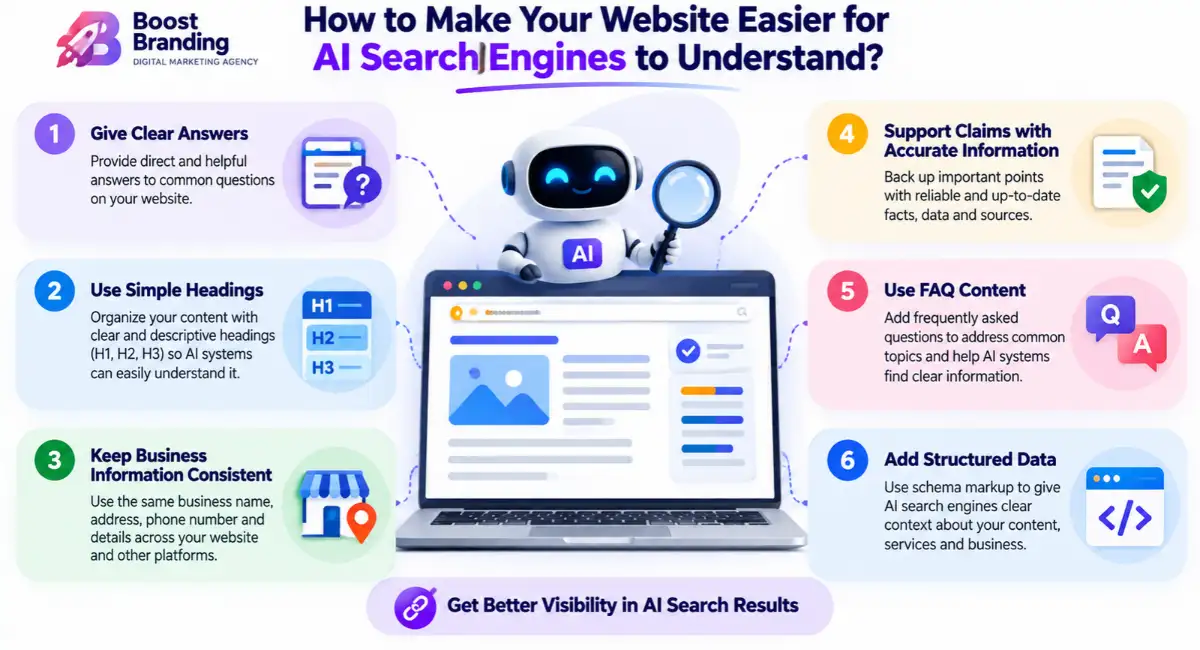
AI search optimization is shaping your content so AI search tools like Google AI Overviews, ChatGPT, Gemini and Perplexity can understand it and use it in their answers.
You may also hear it called generative engine optimization (GEO) or answer engine optimization (AEO). Nobody has a proven formula yet, but these habits make sense:
- Put a clear, direct answer at the top of each section
- Use plain headings that match real questions
- Add FAQ content and structured data
- Keep your business details consistent across the web
- Back claims with accurate, original information
- Build brand mentions on trusted sites
The good news is that most of this is also good traditional SEO. You aren’t starting over.
AI Overviews can lead to more zero-click searches, where the answer appears on the results page and people don’t visit a site. That makes brand mentions more valuable, since people may remember your name even if they don’t click. Microsoft Copilot, ChatGPT, Gemini and Perplexity each work from different sources, so check where your brand actually appears instead of assuming.
SEO Content Strategy
An SEO content strategy is a plan for which topics you’ll cover, in what order, and for which stage of your customer’s journey, based on keyword research.
Without a strategy, a blog turns into random posts. With one, every page has a job.
- Research your audience, competitors and keywords
- Find content gaps where competitors rank and you don’t
- Group topics into clusters, with a main page supported by related posts
- Plan a calendar you can realistically follow
- Publish, measure and update based on what Search Console and Analytics show
This is where our content marketing and SEO work meet, and it’s how traffic turns intoleads.
Topic clusters are the backbone of this. A pillar page covers a broad subject, such as technical SEO, and links to detailed posts on subtopics like XML sitemaps or Core Web Vitals. Use Ahrefs or Semrush for a content gap analysis, and build E-E-A-T into every piece with real authors and first-hand examples. Over time this builds topical authority, which tells Google your site is a dependable source on the subject. A broader content marketing strategy and an SEO content strategy overlap, and SEO adds the keyword data that decides what to write first.
Link Building Services
Link building services are done-for-you outreach and content work that earns relevant backlinks, so you don’t have to pitch websites yourself.
A good provider starts with your current backlink profile and your competitors’, then builds a plan. Expect:
- A backlink and competitor gap review
- Link-worthy content, like guides or research
- Outreach to relevant sites
- Clear reports showing the links that were earned
Red flags to watch for:
- Guaranteed rankings
- Very cheap bulk links
- No list of the sites your links came from
- Links from sites unrelated to your business
If you want to talk through your options,contact us.
Ask whether the provider uses white hat link building: guest posting on real sites, content-led outreach and digital PR. Niche edits, where a site owner adds your link to an existing relevant article, can work but carry more risk if they’re bought in bulk, so ask where the sites come from. SEO packages that include links should say how many links you get, what quality standard they follow and how progress is reported in tools like Ahrefs or Semrush.
Digital PR
Digital PR is getting your brand covered by news sites, blogs and industry publications, which earns high-quality backlinks and brand mentions.
Unlike old-style link building, digital PR starts with a story worth sharing. Common approaches:
- Publishing original data or survey results
- Offering expert comments to journalists and writers
- Sharing company news and press releases
- Creating visuals people want to embed
Strong visuals help a story travel, which is wheregraphic designing andvideo editing come in. You can track success through the links earned, referral traffic and growth in searches for your brand name.
Digital PR services work through earned media: coverage you earn because a story is newsworthy, not coverage you pay for. Platforms like Qwoted and Featured connect experts with journalists who need quotes. That’s digital PR link building at its best: high-authority links as a result of real coverage, plus brand mentions that help people and AI tools recognize your name.
FAQs
How often should I do an SEO audit?
A full SEO audit is useful at least once a year. You should also consider an audit after a website redesign, migration, major technical changes, or a sudden drop in organic traffic. Pasted markdown
Which tools can help find technical SEO problems?
Screaming Frog, Semrush Site Audit, Ahrefs Site Audit, and Google Search Console can help you find technical issues. These tools can identify problems such as broken links, indexing issues, duplicate titles, and slow pages. Pasted markdown
How do I find the right keywords for my website?
Start with the services or products you offer and think about the words your customers would use. Then check search data, competition, search intent, and business value using tools such as Google Search Console, Keyword Planner, Ahrefs, or Semrush. Pasted markdown
Can AI-generated content help with SEO?
AI can make SEO work faster by helping with research, keyword grouping, outlines, and analysis. However, the final content should be checked by a person for accuracy, usefulness, and a natural voice. Pasted markdown
How can I make my website easier for AI search engines to understand?
Give clear answers, use simple headings, keep your business information consistent, and support important claims with accurate information. FAQ content, structured data, and trusted brand mentions can also help AI systems understand your website. Pasted markdown
How many backlinks does a website need to rank?
There is no fixed number of backlinks that guarantees rankings. What matters more is getting relevant links from trustworthy websites. A few strong and relevant links can be more useful than a large number of poor-quality links. Pasted markdown
Do business citations still matter for local SEO?
Yes. Consistent business information across trusted directories can help search engines understand and verify your business details. Your Google Business Profile, reviews, relevance, and other local SEO signals also matter. Pasted markdown
What should I check first if my website is not ranking?
Start by checking whether Google can access and index your pages. Use Google Search Console to look for indexing problems, robots.txt blocks, or noindex tags. After that, review your search intent, content, backlinks, and website speed.
Final Thoughts
SEO is built from technical SEO, on-page SEO, content and off-page SEO, with local SEO added for area-based businesses. Fix the foundation first, write pages that answer real questions, and earn trust from other websites over time.
If you want to know where your site stands, the team at Boost Branding will walk you through it honestly. Request a quote or contact us to get started.

One Reply on “What Is SEO? A Complete Guide to How It Works, What It Includes and Your Most Common Questions”